

探索 TypeScript 编程的利器:ts-morph 入门与实践
背景
在开发 web IDE 中生成代码大纲的功能时, 发现自己对 TypeScript 的了解知之甚少,以至于针对该功能的实现没有明确的思路。究其原因,平时的工作只停留在 TypeScript 使用类型定义的阶段,导致缺乏对 TypeScript 更深的了解, 所以本次通过 ts-morph 的学习,对 TypeScript 相关内容初步深入;
基础
TypeScript 如何转译成 JavaScript ?
// typescript -> javascript// 执行 tsc greet.tsfunction greet(name: string) {  return "Hello," + name;
}const user = "TypeScript";console.log(greet(user));// 定义一个箭头函数const welcome = (name: string) => {  console.log(`Welcome ${name}`);
};welcome(user);
// typescript -> javascriptfunction greet(name) { // 类型擦除
return "Hello," + name;
}var user = "TypeScript";console.log(greet(user));// 定义一个箭头函数var welcome = function (name) { // 箭头函数转普通函数
// ts --traget 没有指定版本则转译成字符串拼接
console.log("Welcome ".concat(name)); // 字符串拼接};welcome(user);大致的流程:
tsconfig.json 的作用?
如果一个目录下存在
tsconfig.json文件,那么它意味着这个目录是 TypeScript 项目的根目录。tsconfig.json文件中指定了用来编译这个项目的根文件和编译选项。
// 例如执行: tsc --init, 生成默认 tsconfig.json 文件, 其中包含主要配置{  "compilerOptions": {     "target": "es2016",     "module": "commonjs",     "outDir": "./dist",     "esModuleInterop": true,     "strict": true,     "skipLibCheck": true
  }  // 自行配置例如:
  "includes": ["src/**/*"]  "exclude": ["node_modules", "dist", "src/public/**/*"],
}
什么是 AST?
在计算机科学中,抽象语法树 (Abstract Syntax Tree,AST),或简称语法树(Syntax tree),是源代码语法结构的一种抽象表示。它以树状的形式表现编程语言的语法结构,树上的每个节点都表示源代码中的一种结构。之所以说语法是“抽象”的,是因为这里的语法并不会表示出真实语法中出现的每个细节。
Declaration
声明节点,是特定类型的节点,在程序中具有语义作用, 用来引入新的标识。
function IAmFunction() {  return 1;
} // ---函数声明
Statement
语句节点, 语句时执行某些操作的一段代码。
const a = IAmFunction(); // 执行语句

Expression
const a = function IAmFunction(a: number, b: number) {  return a + b;
}; // -- 函数表达式
TypeScript Compiler API 中几乎提供了所有编译相关的 API, 可以进行了类似 tsc 的行为,但是 API 较为底层, 上手成本比较困难, 这个时候就要引出我们的利器: ts-morph , 让 AST 操作更加简单一些。
介绍
ts-morph 是一个功能强大的 TypeScript 工具库,它对 TypeScript 编译器的 API 进行了封装,提供更加友好的 API 接口。可以轻松地访问 AST,完成各种类型的代码操作,例如重构、生成、检查和分析等。
源文件
源文件(SourceFile):一棵抽象语法树的根节点。
import { Project } from "ts-morph";const project = new Project({});// 创建 ts 文件const myClassFile = project.createSourceFile( "./sourceFiles/MyClass.ts", "export class MyClass {}");// 保存在本地myClassFile.save();// 获取源文件const sourceFiles = project.getSourceFiles();// 提供 filePath 获取源文件const personFile = project.getSourceFile("Models/Person.ts");// 根据条件 获取满足条件的源文件const fileWithFiveClasses = project.getSourceFile( (f) => f.getClasses().length === 5);诊断

// 1.添加源文件到 Project 对象中const myBaseFile = project.addSourceFileAtPathIfExists("./sourceFiles/base.ts");// 调用诊断方法const sourceFileDiagnostics = myBaseFile?.getPreEmitDiagnostics();// 优化诊断const diagnostics =
  sourceFileDiagnostics &&
  project.formatDiagnosticsWithColorAndContext(sourceFileDiagnostics);// 获取诊断 messageconst message = sourceFileDiagnostics?.[0]?.getMessageText();// 获取报错文件类const sourceFile = sourceFileDiagnostics?.[0]?.getSourceFile();//...
操作
// 源文件操作// 重命名const project = new Project();
project.addSourceFilesAtPaths("./sourceFiles/compiler.ts");const sourceFile = project.getSourceFile("./sourceFiles/compiler.ts");const myEnum = sourceFile?.getEnum("MyEnum");
myEnum?.rename("NewEnum");
sourceFile?.save();// 移除const member = sourceFile?.getEnum("NewEnum")!.getMember("myMember")!;
member?.remove();
sourceFile?.save();// 结构const classDe = sourceFile?.getClass("Test");const classStructure = classDe?.getStructure();console.log("classStructure", classStructure);// 顺序const interfaceDeclaration = sourcefile?.getInterfaceOrThrow("MyInterface");
interfaceDeclaration?.setOrder(1);
sourcefile?.save();// 代码书写const funcDe = sourceFile?.forEachChild((node) => {  if (Node.isFunctionDeclaration(node)) {    return node;
  }  return undefined;
});console.log("funcDe", funcDe);
funcDe?.setBodyText((writer) =>
  writer
    .writeLine("let myNumber = 5;")
    .write("if (myNumber === 5)")
    .block(() => {
      writer.writeLine("console.log('yes')");
    })
);
sourceFile?.save();// 操作 AST 转化const sourceFile2 = project.createSourceFile(  "Example.ts",  `
  class C1 {
      myMethod() {
          function nestedFunction() {
          }
      }
  }

  class C2 {
      prop1: string;
  }

  function f1() {
      console.log("1");

      function nestedFunction() {
      }
  }`);

sourceFile2.transform((traversal) => {  // this will skip visiting the children of the classes
  if (ts.isClassDeclaration(traversal.currentNode))    return traversal.currentNode;  const node = traversal.visitChildren();  if (ts.isFunctionDeclaration(node)) {    return traversal.factory.updateFunctionDeclaration(
      node,
      [],      undefined,
      traversal.factory.createIdentifier("newName"),
      [],
      [],      undefined,
      traversal.factory.createBlock([])
    );
  }  return node;
});

sourceFile2.save();
提出问题: 引用后重命名是否获取的到? 例如: 通过操作 enum 类型, 如果变量是别名的话,是否也可以进行替换操作?
源文件如下:
// 引用后重命名是否获取的到?// 操作 AST 文件import { Project, Node, ts } from "ts-morph";// 操作// 设置// 重命名const project = new Project();
project.addSourceFilesAtPaths("./sourceFiles/compiler.ts");const sourceFile = project.getSourceFile("./sourceFiles/compiler.ts");const myEnum = sourceFile?.getEnum("MyEnum");console.log("myEnum", myEnum); // 返回 undefined// -------------------------// compier.ts 文件import { a as MyEnum } from "../src/";interface IText {}export default class Test {  constructor() {    const a: IText = {};
  }
}const a = new Test();enum NewEnum {
  myMember,
}const myVar = NewEnum.myMember;function getText() {  let myNumber = 5;  if (myNumber === 5) {    console.log("yes");
  }
}// src/index.ts 文件export enum a {}
分析原因:
compile.ts 在 ts-ast-viewer 中的结构如下:
而源代码中查找 MyEnum 的调用方法是获取 getEnum("MyEnum"),通过 ts-morph 源码实现可以看到, getEnum 方法通过判断是否为 EnumDeclaration 节点进行过滤。
据此可以得出下面语句为 importDeclaration 类型,所以是获取不到的。
import { a as MyEnum } from "../src/";同时,针对是否会先将 src/index.ts 中 a 的代码导入,再进行查找?
这就涉及到代码执行的全流程:
静态解析阶段;
编译阶段;
ts-ast-viewer 获取的 ast 实际上是静态解析阶段, 是不涉及代码的运行, 其实是通过 import a from b 创建了 模块之间的联系, 从而构建 AST, 所以更本不会在静态解析的阶段上获取 index 文件中的 a 变量;
而实际上将 a 中的枚举 真正的导入的流程, 在于
编译阶段: 识别 import , 创建模块依赖图;
加载阶段: 加载模块内容;
链接阶段: 加载模块后,编译器会链接模块,这意味着解析模块导出和导入之间的关系,确保每个导入都能正确地关联到其对应的导出;
执行阶段: 最后执行, 以为折模块世纪需要的时候会被执行;
实践
利器 1: Outline 代码大纲

从 vscode 代码大纲的展示入手, 实现步骤如下:
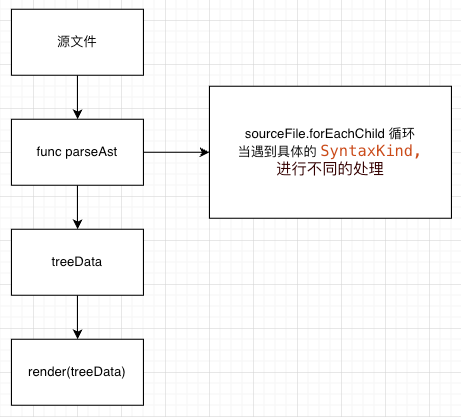
// 调用获取 treeDataexport function getASTNode(fileName: string, sourceFileText: string): IDataSource {    const project = new Project({ useInMemoryFileSystem: true });    const sourceFile = project.createSourceFile('./test.tsx', sourceFileText);    let tree: IDataSource = {        id: -1,        type: 'root',        name: fileName,        children: [],        canExpended: true,
    };
    sourceFile.forEachChild(node => {        getNodeItem(node, tree)
    })    return tree;
}// getNodeItem 针对 AST 操作不同的语法类型,获取想要展示的数据function getNodeItem(node: Node, tree: IDataSource) {    const type = node.getKind();    switch (type) {        case SyntaxKind.ImportDeclaration:            break;        case SyntaxKind.FunctionDeclaration:
            {                const name = (node as DeclarationNode).getName();                const icon = `symbol-${AST_TYPE_ICON[type]}`;                const start = node.getStartLineNumber();                const end = node.getEndLineNumber();                const statements = (node as FunctionDeclaration).getStatements();                if (statements?.length) {                    const canExpended = !!statements.filter(sts => Object.keys(AST_TYPE_ICON)?.includes(`${sts?.getKind()}`))?.length
                    const node = { id: count++, name, type: icon, start, end, canExpended, children: [] };
                    tree.children && tree.children.push(node);
                    statements?.forEach((item) => getNodeItem(item, node));
                }                break;
            }
      ... // 其他语法类型的节点进行处理
    }
}
利器 2: 检查代码
举例: 检查源文件中不能包含函数表达式,目前的应用场景可能比较极端。
const project = new Project();const sourceFiles = project.addSourceFilesAtPaths("./sourceFiles/*.ts");const errList: string[] = [];

sourceFiles?.forEach((file) =>
  file.transform((traversal) => {    const node = traversal.visitChildren(); // return type is `ts.Node`
    if (ts.isVariableDeclaration(node)) {      if (node.initializer && ts.isFunctionExpression(node.initializer)) {        const filePath = file.getFilePath();        console.log(`No function expression allowed.Found function expression: ${node.name.getText()}
            File: ${filePath}`);
        errList.push(filePath);
      }
    }    return node;
  })
);
利器 3: jsDoc 生成
举例: 通过接口定义生成 props 传参的注释文档。
可以尝试一下api 进行组合使用 /** 举个例子
 * Gets the name.
 * @param person - Person to get the name from.
 */function getName(person: Person) {  // ...}// 获取所有functionDeclaration.getJsDocs(); // returns: JSDoc[]// 创建 注释classDeclaration.addJsDoc({  description: "Some description...",  tags: [{    tagName: "param",    text: "value - My value.",
  }],
});// 获取描述const jsDoc = functionDeclaration.getJsDocs()[0];
jsDoc.getDescription(); // returns string: "Gets the name."// 获取 tagsconst tags = jsDoc.getTags();
tags[0].getText(); // "@param person - Person to get the name from."// 获取 jsDoc 内容sDoc.getInnerText(); // "Gets the name.\n@param person - Person to get the name from."TYPESCRIPT复制全屏
参考
最后
欢迎关注【袋鼠云数栈UED团队】~
袋鼠云数栈 UED 团队持续为广大开发者分享技术成果,相继参与开源了欢迎 star



- 探索 TypeScript 编程的利器:ts-morph 入门与实践
- 前端开发和后端开发
- 前端一般用什么语言开发
- 这些 JavaScript 编码习惯,让你最大程度提高你的项目可维护性!
- 前端开发的理解
- 前端是干什么的,好不好就业呢
- 展现量、点击量、点击率;访客数、访问次数、浏览量的区别与作用
- 前端从打基础开始
- 如何让自己的前端知识更全面
- 忘记 localStorage 吧,indexedDB 才是前端存储新宠!
- 使用React.ts创建一个密码生成器的简单示例
- React生命周期中有哪些坑?如何避免?
- 解决electron + react单页应用调用localhost服务失败
- react--编程式导航、antd的使用
- Electron 40.0.0 发布,跨平台桌面应用开发工具
- React学习笔记二
- 用JSX来写Vue3,瞬间找到React 的感觉
- Vue 相关开源项目库汇总
- 神奇的CSS用法之border-radius
- 掌握jQuery,轻松转换JSON对象!解码技巧揭秘,高效编程不再难